
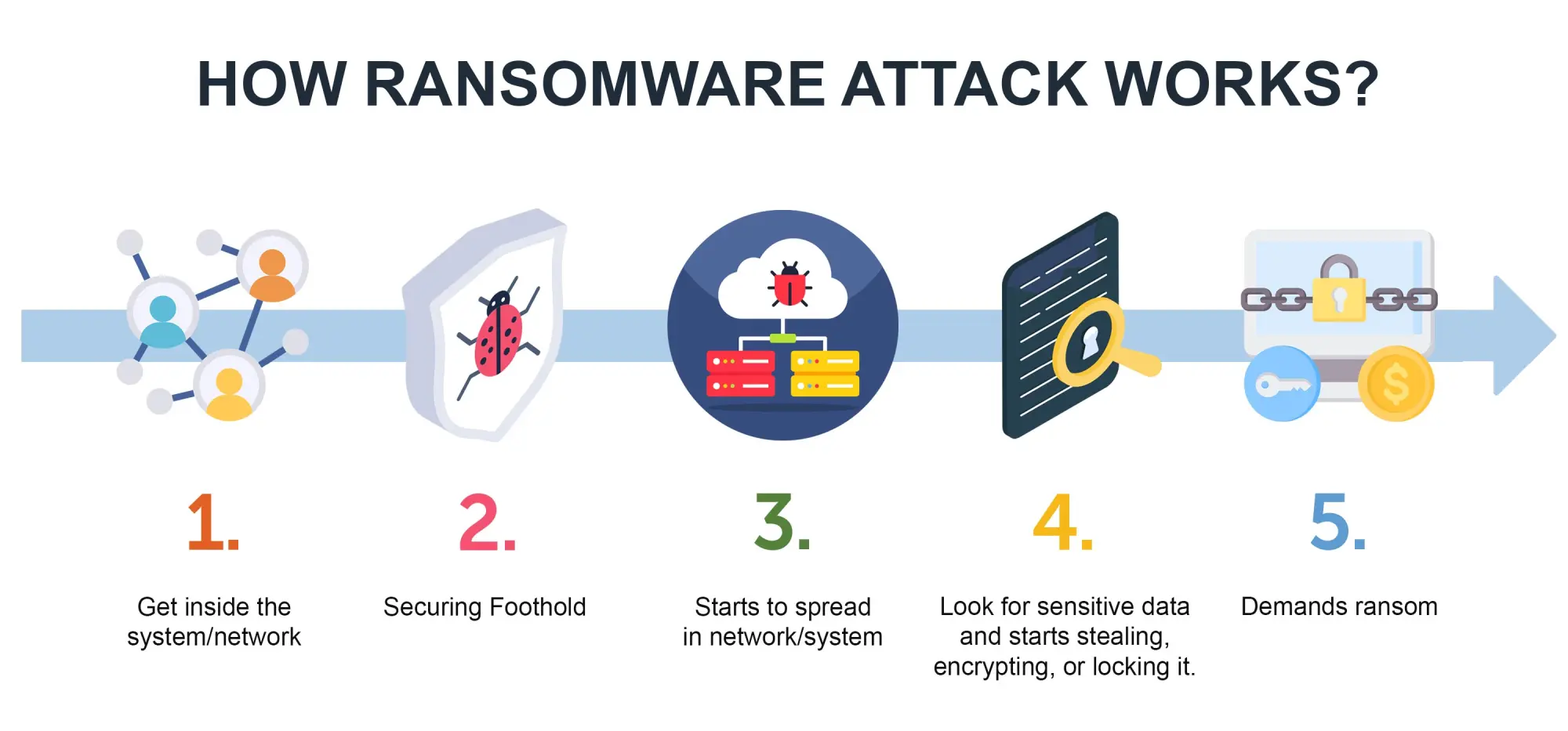
Ransomware is a cyber threat that has been around for the past decade. It is different from phishing, where people are tricked into giving away information. Ransomware directly locks people out of their computers or data until they pay a ransom. Many organizations like hospitals, schools and even governments have been hit by ransomware. It has caused a lot of financial and operational problems. This article will explain how ransomware works, why it is so effective and what people and organizations can do to protect themselves.
- What is Ransomware?
Ransomware is a type of software that locks files or entire computers making them inaccessible. The attackers then demand payment in cryptocurrency to give back access to the locked files. Some types of ransomware also threaten to release information if the ransom is not paid.
- How Ransomware Spreads
Ransomware can get into computers through:
- Phishing emails with attachments.
- Downloading things from websites.
- Taking advantage of software that has not been updated.
- Breaking into computers using Remote Desktop Protocol (RDP) with passwords.
Once ransomware is inside it can spread to parts of the computer network targeting important systems and backups.
- Why Ransomware Works
Ransomware works because it creates a lot of pressure on the victims. They have to choose between losing data or paying the attackers. Hospitals for example cannot afford to have their systems down when peoples livesre at risk. This pressure often makes organizations pay the ransom, which encourages attacks.
- Real-World Impact
In 2017 a ransomware called WannaCry infected a lot of computers around the world. Caused problems for hospitals in the UK.
In 2021 the Colonial Pipeline was hit by ransomware, which disrupted fuel supplies on the US East Coast.
Small businesses are often targeted because they do not have the resources to recover without paying.
Ransomware costs billions of dollars every year. It also causes reputational damage and regulatory penalties.
- Recognizing Ransomware Attacks
Some signs that a computer has been hit by ransomware include:
- Not being able to access files
- Files having extensions like “.locked” or “.crypt”.
- Seeing ransom notes on the computer screen or in folders.
- The computer being slow or having suspicious programs running.
If ransomware is detected early it might be possible to stop it from encrypting all the files.
- Defensive Best Practices
For Individuals:
- Keep software and operating systems up to date.
- Do not click on links or attachments.
- Back up data regularly to a place, like offline or cloud storage.
- Use antivirus and endpoint protection tools.
For Organizations:
- Divide the network into sections to contain infections.
- Train employees to recognize phishing attempts.
- Keep offline backups.
*. Test plans for responding to incidents.
- Limit access to areas using the principle of least privilege.
- Emerging Trends in Ransomware
Attackers are changing their tactics:
- extortion: Locking files and threatening to release stolen data.
- Ransomware-as-a-Service (RaaS): Selling ransomware tools to attackers.
- Targeting infrastructure like energy, healthcare and government systems.
- Using cryptocurrency laundering to hide ransom payments.
- Case Study: The Colonial Pipeline Attack
In May 2021 ransomware hit Colonial Pipeline, the fuel pipeline in the US. The company paid $4.4 million to get its systems back. This attack showed how vulnerable critical infrastructure is. Made the government take action to improve cybersecurity.
- Building Resilience Against Ransomware
To defend against ransomware use security:
- Prevention: Use strong passwords keep software up to date and train employees.
- Detection: Monitor for activity and use intrusion detection systems.
- Response: Have a plan to isolate systems and restore backups.
- Recovery: Test backup restoration regularly to ensure business continuity.
- Checklist for Ransomware Defense
[ ] Update software and systems
[ ] Train employees on phishing awareness
[ ] Keep offline backups
[ ] Divide networks to contain infections
[ ] Test incident response plans every year
Ransomware is a big threat because it is technically sophisticated and puts a lot of pressure on victims. Attackers use vulnerabilities and human mistakes to lock people out of their data. However by taking measures like keeping software up to date backing up data training employees and using layered defenses people and organizations can reduce their risk. The fight, against ransomware is ongoing. Being resilient is possible when security is a daily priority.
contact us more https://meeqam.com/contct us/






[…] Ransomware: How it Works and How to Defend Against it 2026 […]